
Status: July 2026
Why LinkedIn Won't Be Optional in 2026
Just five years ago, Xing was considered the dominant career network in Germany. Current usage figures paint a different picture.
According to YouGov, in February 2026, around 15 per cent of German consumers will use LinkedIn, compared to 8 per cent for Xing. In absolute terms, LinkedIn now has around 25 to 28 million members in the DACH region, while Xing has approximately 22.5 million registered members. In terms of active usage, LinkedIn is growing continuously, while Xing has remained stable over the past few years.
The reason for the shift is structural. Since 2023, Xing has focused on its function as a job portal, discontinuing areas such as groups and events. During the same period, LinkedIn has invested heavily in content formats, video and AI-powered search. While Xing is focused on job seeking and recruitment, LinkedIn functions as an active marketplace – with a feed, newsletters, comment functions, and a recruiter search that semantically understands the competencies contained within a profile.
For specialists and managers in German-speaking countries, this means that an optimised LinkedIn profile will have become the central point of visibility in the job market by 2026.
How Recruiters Really Use LinkedIn
Before we get to the errors, three hard facts from recent studies that explain the urgency to act:
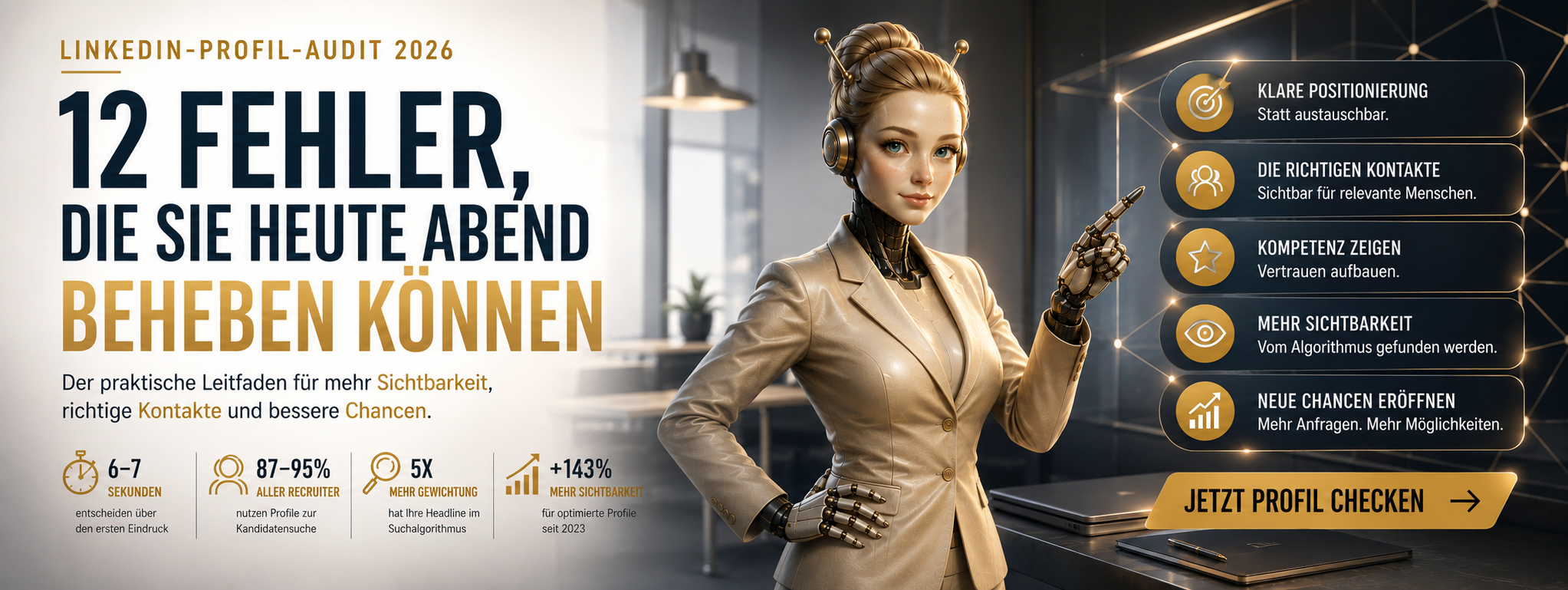
Firstly: Between 87 and 95 percent of all recruiters use LinkedIn as their primary source for candidate searches. For DACH (Germany, Austria, Switzerland) positions from middle management upwards, the platform is practically indispensable.
Secondly: A recruiter spends an average of 6 to 7.4 seconds on their first look at a profile. It's in these seconds that it's decided whether you'll be contacted – or not.
Thirdly: LinkedIn's algorithm was fundamentally overhauled in 2025/2026. It no longer works solely with keyword matching, but with semantic entity mapping: it understands how your skills, titles, and experience fit together. And it rewards active profiles: those who are inactive for months disappear from search results – even with perfectly completed fields.
Stated differently: your profile is no longer a static business card. It is an active, algorithmically rated marketing channel that works for you – or against you – 24 hours a day.
The 12 most common mistakes — and how to fix them
Error 1: No or weak profile photo
The Number: According to LinkedIn data, profiles with photos receive 21 times more views and 36 times more messages than profiles without photos.
Common Mistakes: Holiday beach photo. Crop from a group photo. Selfie in poor lighting. Too far from the camera. Sunglasses.
What works: A simple, professional-looking portrait. You don't need a photographer – a friend with a smartphone, good daylight (window at the back of the person being photographed), neutral background. The face should fill 60 percent of the frame. Eye contact with the camera. A slight smile.
Time commitment: 15 minutes.
Error 2: Empty or generic banner image
Around 67 percent of all LinkedIn users leave their banner image blank or use the default grey. This is wasted space — 1584 × 396 pixels of prominent advertising space directly at the top of the profile.
What works: A simple image that supports your professional positioning. A photo from your work environment (presentation, conference, office). A clean design with your core message ("Sales in the DACH region" / "SAP consulting for SMEs"). Or a visual metaphor for your field of expertise.
Tools like Canva offer free LinkedIn banner templates.
Time required: 20 minutes.
Error 3: The default headline error
The headline is the most important field in your entire profile. It appears in every search result, every connection request, every comment. LinkedIn weights it in the search algorithm with five times the weight of other fields. You have 220 characters available.
What most people do: LinkedIn automatically inserts "Position at Company X". This says nothing about your value. And it makes you blend in with the crowd.
What doesn't work:
- ❌ 'Marketing Manager at XYZ GmbH' — uninformative
- ❌ "Innovative Thought Leader | Disruptor | Change Agent" — Buzzword soup
- ❌ "Looking for new challenges" - passive and weak
What works in 2026 — the formula: [Role/Specialty] | [Specific Added Value] | [Industry/Niche]
Examples:
- ✅ “B2B SaaS Sales Manager | +140 % in revenue over 3 years | SMEs in the DACH region”
- SAP Consultant | Digitalisation of HR Processes | 12+ Years Industry
- ✅ Frontend Developer (React, TypeScript) | Scaling E-commerce Platforms
Important: Use the target title, not your current title – if they are different. If you work as a 'Specialist II' but want to be considered for a Product Manager role, enter 'Product Manager'.
Time required: 30–45 minutes for honest reflection and multiple iterations.
Error 4: The weak entry into the About section
The About section (formerly "Summary") has a capacity of 2,600 characters — but only the first 200 to 300 characters are visible before the "show more" click. It's precisely these characters that decide whether people will read on at all.
What doesn't work: "I am a motivated team player with over 15 years of experience in various areas of the IT industry..." – the algorithmic blandness detector goes off with statements like these.
What works — tried and tested structure:
- You are a specialist in [your role/area of expertise]. You stand for [key qualities/values] and are passionate about [your primary motivation].
- Your career highlights in brief – what has shaped you.
- Specific achievements with figures.
- What you're looking for – and how to reach you.
Example of a strong opening:
I help B2B software companies in the DACH region scale their sales — from their first new customer to a seven-figure revenue mark. Over the last five years, I’ve supported three SaaS startups from their early stages through to Series B.
Time required: 45–60 minutes.
Error 5: The CV Copy-Paste
A common mistake, especially among managers: the experience section is copied directly from the CV. This produces a profile that performs below average on both levels.
Why this doesn't work: A CV is written for a specific recipient in formal language. A LinkedIn profile is indexed by an algorithm and scanned by strangers comparing dozens of candidates.
What works: Each position describes three to five concrete successes with figures – not a job description.
Before
Later
The second version shows effect, not activity. It also contains keywords (HubSpot, ARR, DACH) that will be indexed by the algorithm.
Error 6: 50 generic skills
LinkedIn allows for up to 100 skills. This is not an invitation to list everything you've ever done.
What doesn’t work: “Microsoft Office,” “teamwork,” “communication,” “time management” – listing such generic points in 2026 signals a lack of prioritisation to the algorithm (and to recruiters).
What works: 10 to 20 concrete skills relevant to your target role. Ideally, combinations of:
- Technical Skills: concrete tools and methods (SAP S/4HANA, Python, Salesforce, IFRS)
- Domain skills Industry knowledge (Automotive, HealthTech, Regulatory Affairs)
- Process skills Methodologies (Agile, Lean, OKR)
Additional leverage: LinkedIn offers Skill Assessments – short tests that allow you to have specific skills verified. According to LinkedIn data, profiles with verified skill badges rank 30 percent higher in recruiter searches for the relevant skill.
Error 7: Few or no recommendations
Recommendations are one of the most underrated levers on LinkedIn. A profile with three or more detailed recommendations is rated as significantly more credible by both the algorithm and recruiters.
What most people get wrong: Two-line endorsements from peers (“X is a great colleague…”).
What works: Recommendations from former supervisors, clients, or senior colleagues – with specific projects, concrete results, and a character trait.
Trick: Make it easy for the referrer. Send a brief suggested text: "If you could mention [specific project], [the outcome], and [a personal quality], that would be perfect." Most people will then agree.
Goal: At least three strong recommendations. Time commitment: a few weeks, but getting started is a single email tonight.
Error 8: The dead profile
The most often overlooked factor, by a long shot. LinkedIn's algorithm massively rewards activity and punishes inactivity. If you don't post anything, leave comments, or make connections for six months, you'll disappear from recruiter searches. Even with a perfectly filled-out profile.
What works — the minimum dose:
- One post per week. It doesn’t need to go viral. Three factual sentences about an observation from your industry are sufficient.
- 3 to 5 comments per week on posts in your target industry. Substantial, not "Great post!".
- Regularly updating certificates, skills, and roles.
This activity pays out with a time lag: you typically see effects after 4 to 8 weeks of consistent implementation.
Error 9: The default URL
LinkedIn automatically generates URLs like linkedin.com/in/thomas-mueller-8a3b7c9d2. That is:
- Unattractive: looks random
- Bad for Google: People search for you – and if your LinkedIn URL includes your name, your profile will appear higher up
- Difficult to share: on business cards, in email signatures, in applications
What works: Adjust the URL. Ideally linkedin.com/in/thomas-mueller or linkedin.com/in/thomas-mueller-sales.
Time taken: 2 minutes. Find this under "Edit Profile" → "Public Profile and URL".
Error 10: Incorrect "Open to Work" setting
Those actively searching activate the "Open to Work" feature. But the setting is crucial.
The mistake: The green #OpenToWork frame around your profile picture — visible to everyone. This signals to competitors and your current employer that you’re looking for a new job. It can also be interpreted as a sign of ‘desperation’ — which weakens your negotiating position.
What works: The "Recruiter Only" setting. This option signals your interest in opportunities exclusively to LinkedIn Recruiter accounts – not to your connections, colleagues, or current employer.
You will find this setting under "Open to Recruiters" → "Who sees I'm open to jobs". Time commitment: 3 minutes.
Error 11: Keyword Stuffing
A common piece of advice from old optimisation guides: "Repeat your most important keywords as often as possible." That's outdated by 2026.
LinkedIn's current algorithm detects unnatural keyword densities and downgrades such profiles. Someone who crams "project management" into their profile 47 times won't be found better – quite the opposite, in fact.
What works instead: Use relevant keywords naturally integrated into your headline, about section, experience, and skills. The algorithm understands context. If you write "Project Manager" in your headline, describe specific projects in your about section, and list "PRINCE2" and "Scrum" in your skills, it will be recognised coherently as expertise – significantly stronger than repeating the same term 20 times.
Error 12: No LinkedIn newsletter or featured content
Two relatively new features, hardly anyone uses - and which bring disproportionate benefits.
LinkedIn Newsletter: From 150 followers, you can launch your own newsletter. Subscribers will receive your posts directly via email. For professionals in niches (tax consulting, compliance, specialised engineering fields), this will be one of the most effective visibility channels in 2026.
Featured Section: Directly below the profile header, you can highlight selected posts, presentations, articles, or external links. Use this section for: Your best LinkedIn posts, a PDF of your CV, a case study, a professional article you've written.
Both functions are free. Both are ignored by 95 percent of users. Whoever uses them immediately stands out.
The 30-minute express check for this evening
If you cannot implement all 12 points at once – the following five changes deliver 80 percent of the effect and can be done this evening in half an hour:
- Optimise Headline — Formula: "[Role] | [Value] | [Niche]" (10 mins)
- Rewrite the first 200 characters of the About section — Hook, Role, Value (10 mins).
- Personalise URL (2 mins)
- Skills to 10-20 most relevant (5 mins)
- Check "Open to Work" setting and change to "Recruiters only" if necessary (3 mins)
The rest (photo, banner, experience section, recommendations, activity, newsletter) will follow in further sessions.
When professional support is worthwhile
An optimised LinkedIn profile isn't rocket science – but it does take time and honest self-reflection. Those who are in the thick of their careers often don't have the distance to view their own profile from a recruiter's perspective.
This is precisely why LinkedIn optimisation has become part of the standard repertoire of professional career services. Specialised providers – from simple rewriting services to fully integrated job placement agencies – offer:
- Keyword research for your target role (extracting relevant terms from 30+ job descriptions)
- Headline and About Rewrite with Industry-Typical Phrasing
- Positioning Strategy — the role you aim for and how you position yourself for it
- Activity Coaching — what you post, how you comment, who you connect with
- Integration into a broader career strategy (speculative application, direct approach, hidden job market)
Conclusion: An afternoon with long-term impact
The twelve mistakes above sound unspectacular. But their impact is structural. An optimised LinkedIn profile leads, according to LinkedIn's own data, to:
- 21 times more profile views (with photo)
- 40 times more likely to be contacted (with a fully optimised profile)
- 71 percent higher likelihood of an interview invitation
- 30 percent higher placement in recruiter searches (with verified skills)
These figures are not marketing exaggerations — they come from internal LinkedIn studies and have been independently confirmed multiple times.
The effort for basic optimisation ranges between 3 and 6 hours, spread over several sessions. The effect lasts for months, often years. Few professional investments offer a better ratio of time spent to impact achieved.
Anyone who honestly reviews their profile this evening and addresses their three weakest points has already taken the first step.
Methodological note
The statistical data comes from LinkedIn's own publications, YouGov surveys (February 2026), Cognism studies 2025/2026, and published industry analyses on DACH market development. Specific effects of individual changes vary by industry, career level, and region.
Legal notice: LinkedIn is a registered trademark of the LinkedIn Corporation. Xing is a registered trademark of New Work SE. This article has no business connection with these companies and does not represent an official recommendation or certification by them. All mentioned features, statistics, and recommendations are based on publicly available information at the time of publication.

 Deutsch
  Deutsch (Österreich)
  Deutsch (Schweiz)
  English (Australia)
  English (Canada)
  English
  English (UK)
  हिन्दी
  العربية
  Türkçe